Monday, May 17, 2010

Back breaker


Saw this in an IT article about party bands. I feel for the poor guy dancing around stage with a Korg Trinity. Those babies weren't light. Or wireless.

Saturday, May 15, 2010

I love Google search suggestions

Type "how to tell" and see what you get. As of right now this is the list, which reads like a story:


  1. how to tell if a guy likes you

  2. how to tell if a girl likes you

  3. how to tell if someone is lying

  4. how to tell if a girl is a virgin

  5. how to tell if your [sic] pregnant

  6. how to tell a girl you like her

  7. how to tell a guy you like him

  8. how to tell if a guy likes you quiz

  9. how to tell your parents your [sic] pregnant

  10. how to tell if a diamond is real


Please tell me Google is manipulating it for PR purposes!

Wednesday, October 21, 2009

UPS Fedex mail

I don't like mornings, and I can't multi-task, especially if one of the tasks is talking. So reading my emails this morning while on the phone was always going to be a bad idea! Especially when the mail is this one...

The sender was "United Parcel Service", but the subject was "Fedex Tracking N5421062126". Yes, they're two completely separate and competing companies, but no alarm bells in my still-asleep head. Neither did it raise my suspicions that I haven't ordered anything that might be delivered by these guys, nor that it was addressed to an email I don't use any more.

Here's the not-too-convincing body:

Unfortunately we were not able to deliver postal package you sent on October the 18st in time because the recipient's address is not correct.
Please print out the invoice copy attached and collect the package at our office

Your UPS


No detail whatsoever, and something tells me UPS doesn't sign off mails to their customers like that (I could be wrong!).

Still on the phone, I read the body, failed to notice the sender reconnoiteringpk1@razzi.com, and open the attachment! Luckily it was a zip, and finally something must have clicked in my brain to stop me run the executable inside.

When the call finished I came out of autopilot and only then realised how close I'd come to riddling my PC with all sorts of who-knows-what. Moral of the story: stay in bed till after lunch :)

Monday, August 31, 2009

Whose View ?

The last Tuesday Push featured a great site called Whose View. It's an Irish review website that allows users to rant and rave about products and services. It has all the main categories you'd expect:


  • Restaurants

  • Food & Drink

  • Bars & Nightlife

  • Shopping & Fashion

  • Health & Beauty

  • Arts & Culture

  • Hotels & Travel

  • Local & Home Services

  • Recreation

  • Automotive

Of course I'm most interested in the last one – it should keep the car dealers on their toes!
Wednesday, June 10, 2009

PNG images appearing darker in IE8?

I've noticed this happening on a couple of sites. I'm not sure if it's really just an issue with the way Photoshop saves colour information, but no doubt it's useful to know.

See discussion on Boagworld

Tuesday, June 02, 2009

Windows 7 compatibility

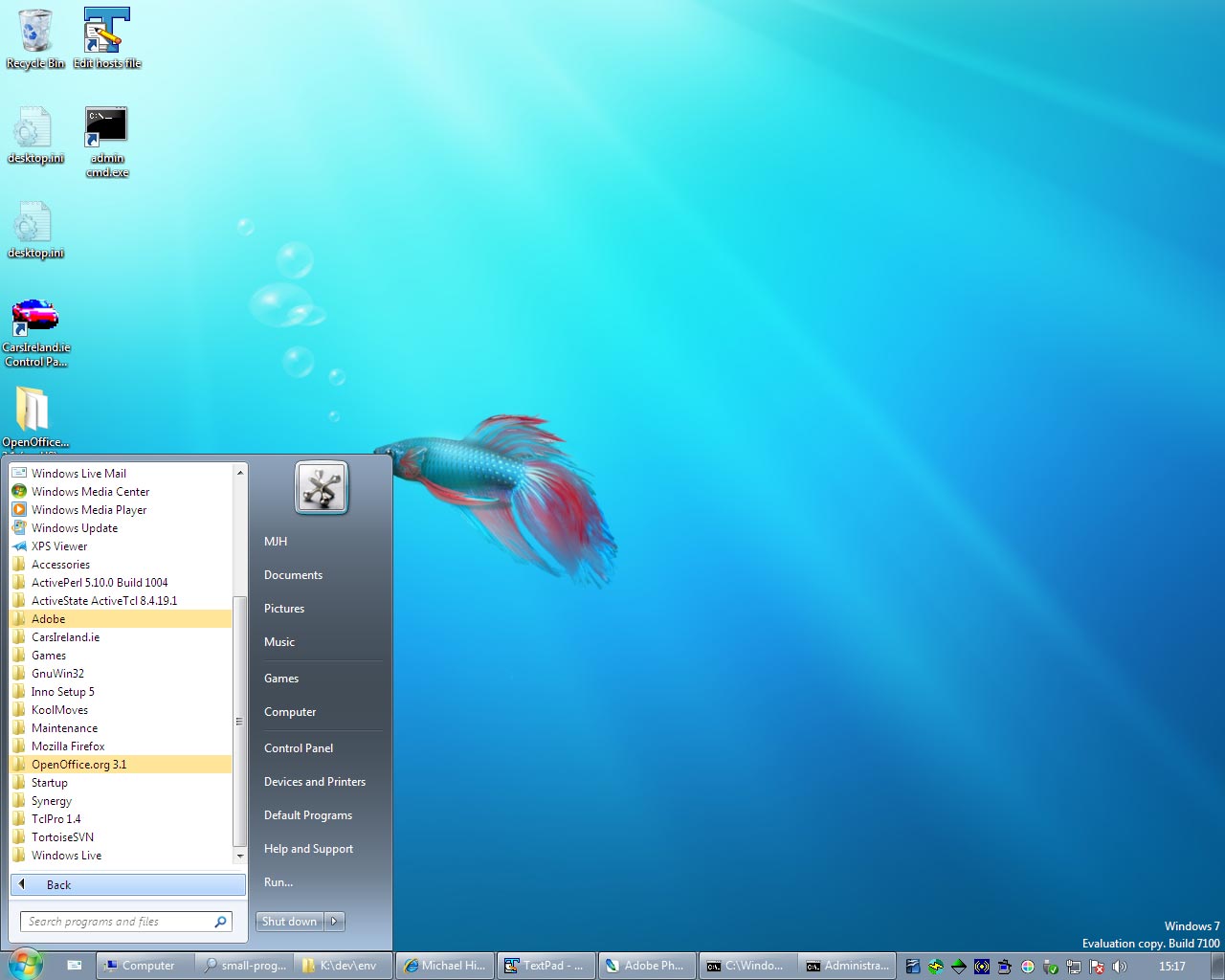
The transition from XP to Win7 has been great, so far. There are a couple of tools I still haven't installed, but everything I need for day to day work is up and running without issues. FWIW here's a list of apps that are running successfully on Windows 7:


  • Adobe Reader 9

  • Firefox 3

  • Textpad 5.2

  • Open Office 3.1

  • Skype 4.0

  • Photoshop CS2

  • ActivePerl 5.10

  • ActiveTcl 8.4.19

  • Collabnet Subversion Client 1.6.2

  • Tortoise SVN 1.6.2

  • InnoSetup 5.2.2

  • Koolmoves 6.2

  • WinMerge 2.12

  • VMware Workstation 6.5

  • Synergy 1.3.1

  • putty 0.54

  • XAMPP 1.7.1 which includes

    • Apache 2.2.11

    • MySQL 5.1.33

    • PHP 5.2.9

    • SQLite 2.8.15

    • OpenSSL 0.9.8i


Saturday, May 23, 2009

Windows 7 shutdown

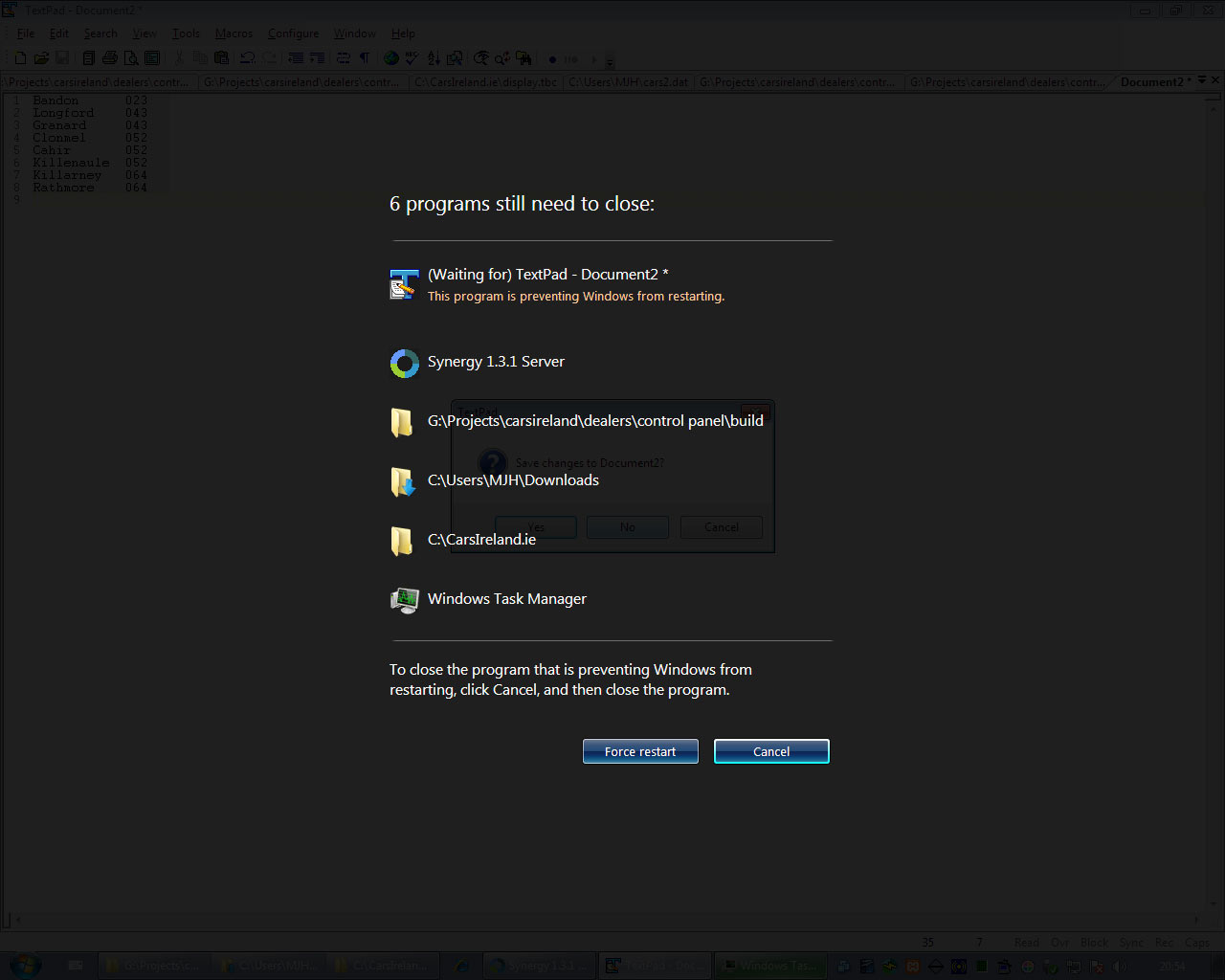
If you have lots of programs running, there's a nice looking screen shown after you've chosen to restart or shutdown. It lists the programs that are still open, and they fall off the list as they close down. You can choose to cancel or to force the action. It seems like a more graceful way than in XP where you can be waiting minutes for it to notice if programs are holding up the shutdown.


The only problem for me is Textpad always has an unsaved doc that I've forgotten about, and I have to cancel the shutdown in order to get back to Textpad and choose what to save or discard. Then I have to initiate the shutdown again. In XP I could always switch back to Textpad to close it, and shutdown would still be in progress.

Wednesday, May 20, 2009

Windows XP / Windows 7 dual boot

Almost as soon as I'd installed Win 7 RC in a vmware, and saw that it was good, I reckoned it was time to give it a go as my main OS. The main reason I have for upgrading is for performance and it was obvious that running it virtually wasn't going to be fun!

So I used gparted to resize my main partition. Luckily I had over 100GB free so I was able to create a primary partition of 50GB for Windows 7. I booted off the install DVD and installed windows as you normally would, and now I have the option of booting into my earlier version of windows (XP) or 7. After installing most of the stuff I need day-to-day I've used about 10GB of disk space.

I've had to do some testing and application support on Vista, but I haven't used it for any length of time, so everything in 7 is new to me. So if I say "hey, Windows 7 has this cool new x" don't come back to me saying "Duh, that's not new, x was in Vista". ;)

Having said that, I think having to use Vista broke me in gently to some of the new concepts and made me more accepting than if they were brand new. For example, I don't know why my programs menu has to be limited to a tenth of the screen space. I much preferred the ever expanding sea of grey that you got on an old XP system. But I'm getting used to the new start menu, and I daresay I'll start using the program search in time.


There's lots more to come on Windows 7, but from first impressions it's looking good. It's fast and responsive, and I haven't hit any brick walls yet during my usual work, although some things take a bit of Googling to see where/why things have moved! Hopefully I'll get a chance over the next while to do a few little posts. One thing I'll definitely do is a list of compatible programs & applications. So far only two haven't worked and they were both games!

Sunday, May 17, 2009

Installed Windows 7 RC

Having missed out on the beta I was happy to see anyone can download the Windows 7 Release Candidate. It took about an hour and a half to install in Vmware, but that's not surprising since my XP is running like a dog these days, and because I only have 1GB of physical RAM I could only allow the VM 768MB (1GB is the minimum).

I've had a quick play, and it seems similar to Vista at first glance. I haven't seen the UAC yet, but I've only played with the new versions of Paint, Calc and Stickies, and messed with a few things in the control panel.

Networking isn't working. Not sure if this is a problem with Vmware or Windows 7. Hopefully I'll have a dual boot working so I can test it natively soon. Maybe it'll be a good thing if I don't get it working though... Those cunning Microsofties have given us the Ultimate version so if I get used to it I doubt I'll want to buy one of the lesser versions when the time comes!

Thursday, April 23, 2009

Skype listens on port 80!

Well, I had a little fright today. I tried to start up my Apache dev server on my PC and it said port 80 was taken! Now my internet connection hasn't been behaving itself recently, so I've been running TCPView (part of sysinternals) all the time anyway. A quick look at the list of connections there told me Skype was the culprit. Sure enough, if you look under Tools -> Options -> Advanced -> Connection in Skype you'll see a tick box called "Use port 80 and 443 as alternatives for incoming connections". Obviously it's a way of getting through firewalls, but I'm not sure it should be on by default without me ever being told!

Friday, April 17, 2009

List all the fonts installed on a Windows PC (with Internet Explorer)

I wrote a web page to list all the fonts on a Windows system and give you a sample of text in each font. It's IE only I'm afraid.

http://www.michaelhinds.com/tech/win/fonts-on-windows.html

Saturday, March 28, 2009

IE8 makes itself the default browser in XP

So I installed IE8 and it's nice. It renders much better than the last time I looked at it and haven't had to change any pages so far. Unfortunately they haven't grown out of the childish game of making IE the default browser. If you don't use IE as your main browser, you can change it back to Firefox or whatever in the usual way using "Set Program Access and Defaults" in Control Panel -> Add Remove Programs. However, if you click on a link from e-mail after doing this you'll still get IE! To fix the problem you need to:


  1. Open any Explorer Window (e.g. My Computer).

  2. Select Tools -> Folder Options

  3. Under the file types tab, near the top there's an entry with no extension called "URL: HyperText Transfer Protocol". Select this.

  4. Click advanced, click edit and change the application to your browser.

  5. I couldn't be bothered looking up the DDE interface, so I just changed it to be the same as for the .html entry. For Firefox this just means changing the -1 to 0

  6. Ok everything and e-mail links should open properly. Notice there are a couple of other protocols beside the entry we just changed which you might want to do the same with.


Thursday, February 26, 2009

Finding current element in Firefox

Here's a little tip for people using the web developer extension for Firefox. Sometimes when using the "Outline current element", the path to the element is so long it doesn't fit on screen. To get the full path, leave the mouse where it is outlining the element you want, press ALT+D to jump into the address bar, tab until you're in the web developer box containing the path, then CTRL+C to copy the path to the clipboard.

I'm using Windows but no doubt you can figure out the same on other operating systems!

Wednesday, February 18, 2009

Walkers "Do me a flavour"

Builder's Breakfast wins it for me, followed by Cajun Squirrel. The rest all taste like they're supposed to but don't really work as a crisp. To be honest none of them would tempt me over the classic Walkers!

Wednesday, October 22, 2008

IE rendering mode

If you want to know whether you're in quirks or standards mode, enter this into the address bar:

javascript:alert(document.compatMode)

CSS1Compat = standards
BackCompat = quirks

Thursday, October 16, 2008

Setting the time on Windows XP with NTP

I finally got around to installing ntp on our servers to help keep the times in the logs in sync with each other. It occurred to me that you might be able to do the same in Windows XP, and it happens to be trivial:


  1. Double click the clock on the task bar.

  2. Select the internet time tab

  3. Enter an ntp server near you, e.g. ie.pool.ntp.org for Ireland. Read http://www.pool.ntp.org/use.html for other locations.


XP will update the time every week as long as you're on the net.

Tuesday, September 02, 2008

Chrome and Gustav


Today the BBC reported that although hurricane Gustav thankfully turned out a good bit tamer than Katrina, some areas of the Gulf Coast have been left underwater.
Also today, Google released their new web browser, and posted a video titled "The Story Behind Google Chrome". As I watched the various nerds sell the new product, I notice one chooses an, errr, interesting metaphor. Coincidence?!

Wednesday, August 13, 2008

KoolMoves says "One or more ActiveX controls could not be displayed"

It's a bit of a no brainer, but if you get that error in KoolMoves you need to allow ActiveX controls to run in the Internet zone in Internet Explorer (I got it trying to preview a Motion Script effect).


In IE7 you either double-click the globe in the status bar , or go to Tools -> Internet Options and select the security tab.


Make sure the Internet zone is selected and click "Custom level..."


Scroll down to the ActiveX settings (there's a good few) and under "Run ActiveX controls and plug-ins" select "Enable".


Say yes to make the change, and Ok twice. You don't have to restart IE or KoolMoves, just reselect an effect and it should work. If it doesn't, make sure you have the Flash plug-in and check your other ActiveX security settings in the same place.

Tuesday, July 08, 2008

Colour (color) picker pipette tool


Yeah, some serious keyword stuffing in the title there. I can't believe I've only just found this little tool. It lets you select the RGB colour values for any pixel on screen by dragging from the system tray. It can automatically copy to the clipboard and has multiple formats including HTML/CSS, VB hex, HSB.


http://instant-eyedropper.com/


That's the PC version. For real designers there's this one for the Mac (check out the page in a decent browser to see the nice, scrolling app icons at the top):


http://www.freemacware.com/pipette/

Javascript framework feature comparison

This is a useful slide show, although be warned it's by the lead developer of jQuery, so most probably less than impartial:

http://www.slideshare.net/jeresig/javascript-library-overview/